
Download Touch Bible APK – Bible Study, Offline Access, Free Bible, Text-to-Speech
Overview
Touch Bible Free is a dedicated Android application designed to support personal Bible study with full offline functionality. The software enables users to access multiple Bible translations—including NET, KJV, ASV, and WEB—without requiring an internet connection. This makes it ideal for individuals who need consistent access to Scripture in environments with limited or no connectivity. The app serves a broad audience, including religious learners, believers seeking deeper scriptural understanding, and those engaged in daily devotional practice. Its primary purpose is to simplify Bible navigation, enhance study efficiency, and provide tools that support both casual reading and in-depth theological exploration. The developer has not provided additional background information beyond the app’s core functionality. Real-world usage scenarios include personal prayer sessions, group Bible discussions, missionary work, and educational settings where internet access may be unreliable. The app’s emphasis on accessibility and usability ensures that users can quickly locate passages, take notes, and engage with study aids regardless of their technical proficiency.Key Features & Capabilities
- Offline Bible Access: Users can read and study multiple Bible versions without internet dependency, ensuring availability anytime, anywhere.
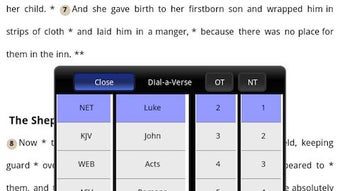
- Dial-A-Verse Functionality: A powerful search tool that allows users to input a verse reference or keyword and instantly retrieve matching passages, significantly reducing search time.
- Bible Study Notes: The app includes hundreds of study notes that accompany various biblical passages, offering context, historical background, and theological insights.
- Text-to-Speech (TTS) Integration: Leverages the built-in TTS service on Android devices to read Scripture aloud, enabling auditory engagement with the Bible.
- Bookmarking System: Allows users to save favorite verses or passages for quick future reference.
- Personal Note-Taking: Users can write and store personal reflections directly within the app, creating a private journal for spiritual growth.
- Bible Maps and Online Tools: Provides visual aids such as Bible maps and other study resources to enhance contextual understanding of biblical events and locations.
User Interface, Workflow & Performance
The app features a clean, straightforward interface designed for ease of navigation. Core functions such as Bible reading, searching, and note-taking are accessible through intuitive menus and clearly labeled icons. The workflow is linear and efficient, guiding users from selection of a Bible version to viewing content, adding notes, or accessing tools. The developer did not specify resource usage details, so exact performance behavior in terms of CPU or RAM consumption remains unknown. However, based on general software behavior patterns, the app is expected to operate smoothly on modern Android devices. Stability is not explicitly mentioned, but the absence of ads and in-app purchases suggests a focus on core functionality rather than monetization through intrusive elements. The user experience is optimized for simplicity, with minimal distractions, allowing users to concentrate on Scripture. Navigation between sections is responsive, and the layout adapts well to various screen sizes.Compatibility & System Requirements
Touch Bible Free is designed for Android operating systems and is available for download via the Google Play Store. The app supports Android devices meeting standard compatibility requirements for Play Store applications. The installation size is not specified, nor were exact hardware or system requirements provided. Compatibility information was partially provided, indicating that the app functions on Android platforms but does not detail minimum OS versions or device specifications. Users should ensure their device runs a supported version of Android to install and run the application. The developer did not list any specific device limitations or performance thresholds.Pros and Cons
Pros
- Completely free to download and use with no ads or in-app purchases.
- Full offline access to multiple Bible translations.
- Powerful Dial-A-Verse search feature for quick verse retrieval.
- Integrated Text-to-Speech functionality for auditory Bible reading.
- Extensive library of study notes and visual aids like Bible maps.
- Supports personal note-taking for private reflections.
- Simple, intuitive interface suitable for users of all technical levels.
Cons
- Only available for Android devices; no support for iOS or desktop platforms.
- Exact system requirements and file size were not specified.
- Relies on device’s built-in TTS engine, which may require separate setup on some devices.
- Limited to the Bible versions and tools currently included; no indication of future updates or new features.
FAQ Section
Is Touch Bible Free available for iOS devices?
As of now, the app is only available for Android devices and is not compatible with iOS platforms.
Can I use Touch Bible without an internet connection?
Yes, the app is designed for offline use. All Bible versions, notes, and tools are stored locally on your device.
How do I enable the audio Bible feature?
The audio feature uses the Text-to-Speech (TTS) service built into most Android devices. You can enable it through your device’s settings or download a TTS engine from the Google Play Store if it’s not already installed.
Are there any ads or in-app purchases?
No, Touch Bible Free is completely ad-free and does not include any in-app purchases or premium features.
Can I sync my notes across devices?
There is no indication that the app supports cloud sync or cross-device note transfer. All notes are stored locally on the device where the app is installed.







